
TL;DR
Choosing the right eBay category and completing your item specifics can make your listings easier for buyers to find without spending money on advertising.
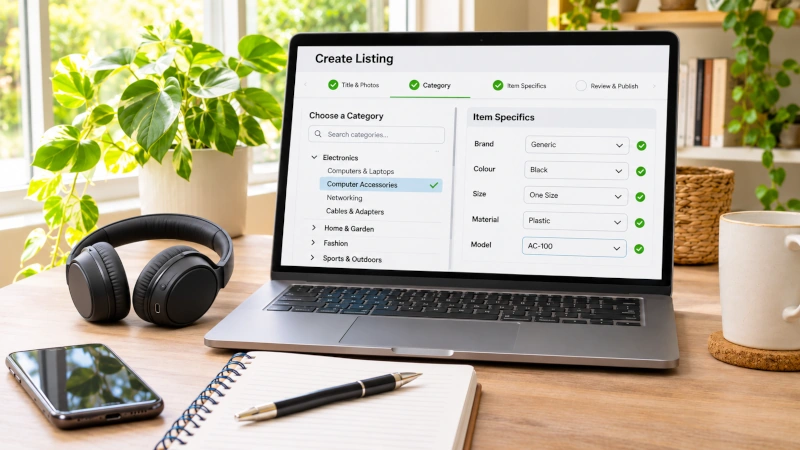
Item specifics such as brand, size, colour, material, model and style help eBay understand what you are selling. They also allow your listing to appear when buyers narrow their searches using filters.
The important part is accuracy. Fill in as many relevant item specifics as you can, but never add information simply to fill a field.
One of the Most Overlooked Parts of an eBay Listing
When people start selling on eBay, most of their attention naturally goes to the photos, title, price and postage.
Those things are important, but there is another part of the listing that is easy to rush through: the category and item specifics.
They might look like boring boxes to complete before you can publish the listing, but they actually help eBay understand exactly what you are selling and connect your listing with the right buyers.
eBay describes item specifics as information such as the brand, size, colour, type, style and model of an item. Buyers can then use those details to filter search results. If your listing does not contain the relevant item specific, it may not appear when a buyer applies that filter.
That makes item specifics one of the easiest visibility improvements available to a seller.
What Are Item Specifics?
Item specifics are the structured details that sit behind your listing.
Depending on what you are selling, they might include things such as:
Brand, size, colour, material, model, style, type, capacity, pattern, compatibility or country of manufacture.
The fields change depending on the category because the details somebody needs when buying a shirt are very different from the details they need when buying a computer part or a piece of furniture.
This is the important difference between your description and your item specifics.
Your description is written for the buyer to read.
Item specifics are structured information that helps both the buyer and eBay’s search system understand the item.
eBay says item specifics are one of the main ways it matches listings to buyer searches, including search filters, category pages and external search engines such as Google Shopping.
Why Item Specifics Can Improve Visibility
Imagine you are selling a men’s blue jacket in size large.
You might have all of those words in your title and description. But a buyer may not search by typing every detail.
Instead, they might search for jackets and then use eBay’s filters:
Men’s
Blue
Large
If you have filled in those item specifics correctly, your listing can remain in the filtered results.
If you have left the size or colour field blank, your listing may disappear when that buyer applies the corresponding filter. eBay specifically says listings only appear in filtered results when the matching item specific has been added.
This becomes particularly important on mobile devices, where buyers often use filters rather than scrolling through hundreds of listings.
Required, Recommended and Additional Item Specifics
Not every item specific has the same importance.
eBay currently groups them into categories such as Required, Recommended and Additional. In some areas you may also see Required Soon, which means eBay intends to make that field mandatory in the future.
Required
If an item specific is marked Required, you normally need to complete it before a new or revised listing can be published.
These are generally details eBay considers important for identifying the product and helping buyers shop confidently.
Recommended
Recommended specifics are not always compulsory, but they are worth paying attention to.
eBay says these recommendations are based on buyer demand and frequently searched terms. Completing them can improve the chance of your listing being matched with buyers who are using those attributes in search.
Additional
Additional specifics can give the buyer extra information and may also help reduce questions.
If a field genuinely describes your item and you know the answer, it is generally worth completing.
The key phrase is genuinely describes your item.
Do Not Fill in Item Specifics Just for the Sake of It
More information can help, but inaccurate information can do the opposite.
If you do not know the answer to a particular item specific, do not guess just because you want the listing to look complete.
The details throughout your listing should agree with each other. The title, photos, description, condition and item specifics should all tell the same story.
eBay’s current listing policy requires item specifics to be accurate. It also warns sellers against putting information in the wrong field or using inaccurate placeholder information where the correct product information exists.
For example, if you are selling an item made from glass, do not select ceramic simply because ceramic appears in the suggested options and you feel you should choose something.
Accuracy is more important than filling every box.
Choose eBay’s Suggested Values Where They Are Accurate
When eBay gives you a list of standard values to choose from, it is usually better to use the appropriate suggested value rather than inventing your own variation.
Standard values make it easier for buyers to filter consistently.
For example, if the colour is clearly Blue and eBay offers Blue as an option, selecting that standard value is generally more useful than creating a custom value such as “Beautiful Ocean Blue”.
You can still describe the precise shade in your title or description if it matters.
The structured field is there to help buyers filter.
eBay’s developer guidance says standard and recommended item-specific values help provide consistency and make it easier for buyers and comparison tools to understand what is being sold.
The Category Matters Too
Before item specifics can do their job properly, your item also needs to be in the right category.
eBay organises listings into categories partly so buyers can narrow their search and browse the type of products they are interested in. Choosing the most appropriate category makes it easier for your item to reach the right audience.
When you start creating a listing, eBay will often suggest a category based on your title or the product information you have entered.
That suggestion can save time, but do not assume it is always correct.
Take a few seconds to look at the suggested category before continuing.
Ask yourself a simple question:
If I were a buyer looking for this item, is this where I would expect to find it?
If the answer is no, browse the category options and choose a better fit.
Why the Wrong Category Can Cost You Views
Imagine somebody is searching for a particular collectible.
They may start with a general keyword search, but then narrow the results into the relevant collectibles category.
If you accidentally listed your item under general home décor, it may disappear from that buyer’s search as soon as they refine the results.
The listing still exists, but the person most likely to buy it may never see it.
eBay requires sellers to place items in the most relevant category and notes that many buyers refine their searches by category.
That is why getting the category right should be part of your listing routine, not an afterthought.
Category Choice Also Changes Your Item Specifics
One reason category selection matters is that eBay’s item-specific fields change depending on the category.
If the category is wrong, you may suddenly find yourself being asked questions that make no sense for the item you are selling.
That can be a useful warning sign.
If you are listing an item and the required specifics seem completely unrelated, stop and check the category before trying to force answers into the fields.
Choosing the correct category should give you a set of item specifics that broadly make sense for the product.
Look at Similar Sold Listings if You Are Unsure
If you are not sure which category to use, one practical approach is to search for the same or similar item on eBay and look at successful sold listings.
Check where experienced sellers have placed comparable items.
Do not blindly copy another seller because they can make mistakes too, but if several successful listings for the same product all sit in the same category, that is a useful clue.
The same approach can help with item specifics.
Look at the details buyers and sellers consistently use for similar products. That may highlight an important model number, material, size terminology or product type you had not thought to include.
Your Title and Item Specifics Should Work Together
The title and item specifics are not competing parts of the listing.
They should support each other.
Your title contains the strongest keywords and identifying details that help buyers immediately understand what you are selling.
Your item specifics provide the structured information behind those words.
For example, if your title says:
Canon EOS 600D DSLR Camera Body Black
your item specifics might reinforce that with:
Brand: Canon
Model: EOS 600D
Type: Digital SLR
Colour: Black
That makes the listing clearer to both buyers and eBay.
It also means you do not need to cram every possible detail into the 80-character title.
Use Item Specifics to Answer Questions Before They Are Asked
Item specifics do not only help search visibility.
They can also reduce buyer questions.
If a buyer can immediately see the size, material, model, compatibility or capacity, they may not need to message you for that information.
This is especially useful when selling items where compatibility matters.
A computer part, appliance component or vehicle accessory might look correct in the photos but only work with certain models.
The more accurately you complete relevant specifics, the easier it is for buyers to decide whether the item suits them.
eBay also notes that additional item specifics can help buyers understand the product and potentially save sellers from answering questions later.
Do Not Forget Your Existing Listings
Item specifics are not something you only need to think about when creating new listings.
eBay changes categories and introduces new required or recommended item specifics from time to time.
That means an old listing that was perfectly complete when you created it may eventually have missing information.
Seller Hub provides filters and tools for identifying listings that are missing required, required-soon or recommended item specifics. Sellers with large numbers of listings can also make updates in bulk.
It is worth checking these occasionally rather than assuming all your older listings are still fully optimised.
A Simple Routine When Creating a Listing
You do not need to spend twenty minutes filling out every possible field.
A practical routine is to choose the correct category first, then complete all required specifics, followed by the recommended ones that genuinely apply.
After that, look through the remaining fields and add anything useful that you know with confidence.
That gives you a simple priority:
Correct category → Required specifics → Relevant recommended specifics → Useful additional details.
Once you make that part of your normal listing process, it adds very little extra time.
Why I Call It a Free Visibility Boost
Promoted Listings can increase visibility, but advertising costs money.
Completing your normal item specifics and selecting the correct primary category does not require an advertising budget.
You are simply giving eBay better information about what you are already listing.
That is why it makes sense to get these basics right before paying to promote a poorly completed listing.
If a buyer searches for your product and then filters by brand, size, colour or another attribute you left blank, spending more money on advertising does not solve the underlying problem.
Start with the free optimisation first.
What About Listing in Two Categories?
eBay does allow eligible listings to appear in two categories, and this can sometimes increase exposure if an item genuinely fits both.
However, this is different from simply choosing the correct primary category.
On eBay Australia, adding a second category is currently an optional paid listing upgrade. eBay also warns that other applicable upgrade fees can be charged for both categories, and where the categories have different final value fees, the higher rate can apply.
So do not add a second category simply because you think more categories must be better.
The first category should always be the most appropriate one.
For most ordinary listings, getting that one category right and completing your item specifics properly is the sensible starting point.
Common Item Specific Mistakes
One common mistake is completing only the required fields and ignoring everything else.
Another is guessing answers simply to make the listing appear complete.
Some sellers also put useful information in the description but forget to add the same information to the appropriate item-specific field. A buyer may be able to read that detail once they open the listing, but the listing may not appear when they use filters to find it.
The opposite problem is adding information everywhere without checking whether it is accurate.
The goal is not maximum data.
It is maximum useful and accurate data.
Item Specifics Are Especially Important for Older Stock
If you have had an item listed for a long time without much activity, checking its item specifics is worth doing before assuming the item itself is unwanted.
Look for missing recommended fields.
Check that the category still makes sense.
Compare the listing with similar items currently selling.
Sometimes the listing simply does not contain enough structured information for eBay to match it with the right buyers.
There is no guarantee that filling in another field suddenly creates a sale, but it removes one possible barrier to being found.
Categories and Item Specifics Work Best With the Rest of the Listing
None of this means item specifics can rescue poor photos, an unrealistic price or a confusing title.
All of the parts need to work together.
Good photos help the buyer trust the item.
A clear title helps the buyer find and identify it.
The correct category puts it in the right part of the marketplace.
Item specifics allow eBay to match it with filtered searches.
A sensible price helps turn that visibility into a sale.
That is why improving an eBay listing is rarely about finding one secret trick. It is about getting a number of small things right.
Final Thoughts
Item specifics and categories are not the most exciting part of selling on eBay, but they are too important to rush through.
Choose the category where a genuine buyer would expect to find the item. Then complete as many accurate and relevant item specifics as you can, particularly the required and recommended fields.
Do not guess, do not stuff unrelated information into the fields, and do not assume the description can replace structured item specifics.
The benefit is simple: you are helping eBay understand what you are selling so it can show the listing to buyers looking for exactly that type of item.
And unlike Promoted Listings, getting your primary category and normal item specifics right does not require an advertising spend.
Sometimes one of the easiest ways to get more visibility is simply to give eBay better information.
Leave a Reply